


Sense V2 Flip Clock & Weather
4.23.31K Reviews
App Specs
- Version
- 9.14.0
- Updated On
- License
- Free
- Downloads
- 1,000,000+
- Developer
- MACHAPP Software Ltd
- Categories
- Weather
- Platform
- Android
Screenshots
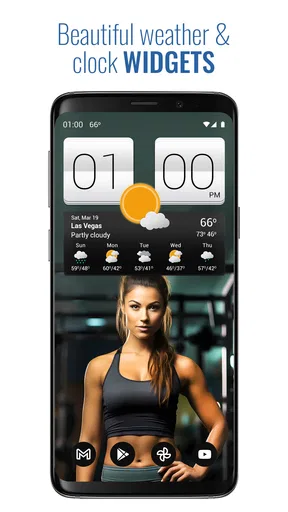
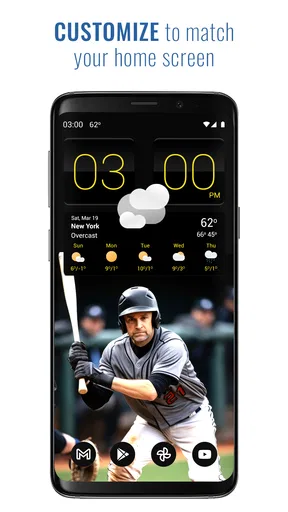
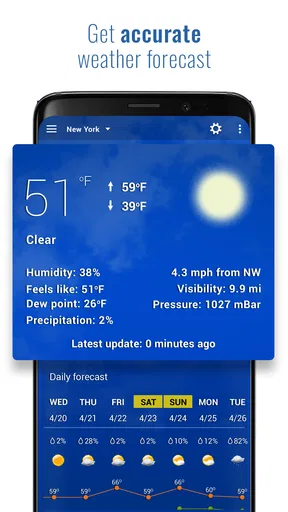
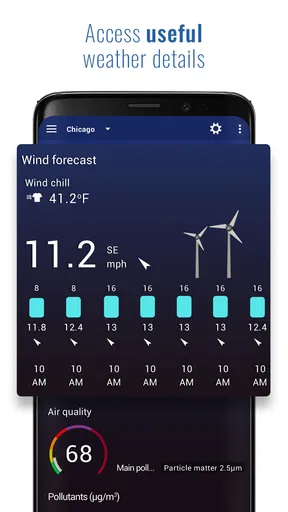
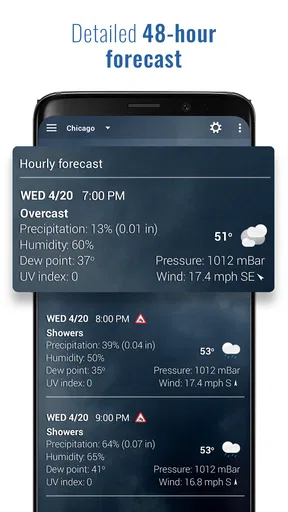
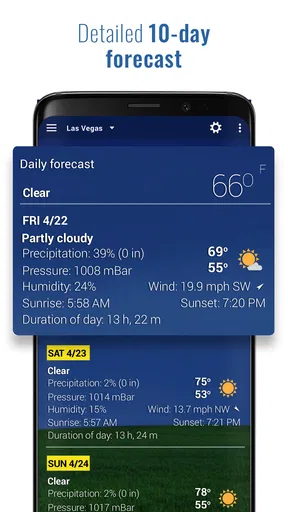
 Analysis by AppCompare
I tend to judge a clock-and-weather app by how quickly it answers two small questions: what time is it, and what should I expect outside? Sense V2 Flip Clock & Weather makes those checks feel more personal than a plain system screen, with a flip-style clock paired with weather information. That combination is its main appeal: it gives the home screen a distinctive look while keeping practical details close at hand.
What the flip-clock approach is good for
The clock is more than decoration if you like seeing the time without opening an app. A widget can make that glance part of your normal home-screen routine, and the flip-card presentation is easier to distinguish from the small digital clock most phones already show. I would choose it for a home screen where I want the time and local conditions to be visible together, rather than for a phone that I keep deliberately minimal.
There is a useful trade-off here. A combined clock and weather display saves a trip between separate apps, but it also takes up screen space that could be used for shortcuts or other widgets. Before settling on a layout, I would try it on the screen where I actually check the weather; a widget is only helpful if its size and placement suit the way I hold and use my phone.
Quick checks versus detailed planning
For ordinary decisions, the app’s mix of current conditions and forecast views is more convenient than opening a full weather service every time. I can imagine checking the hourly outlook before choosing when to run an errand, then glancing at the weekly view when deciding whether an outdoor plan needs a backup. The clock-and-weather pairing is strongest for these short, repeated checks, not as a replacement for careful research during severe or highly changeable conditions.
Multiple locations also serve a specific need: comparing home with a place I am travelling to, or keeping an eye on conditions where relatives live. I would set up only the places I genuinely check. A short location list is easier to scan, while too many entries can turn a quick glance into another task. If I am away from home, I would confirm that the selected location is the one I mean before relying on a forecast for plans.
Making the display work on your phone
The customization is worth exploring with a practical goal, not just for novelty. I would pick a clock skin with clear contrast and test whether the weather details remain easy to read against the home screen. A dramatic style can look appealing in a screenshot but be less useful at a glance, particularly when the phone is on a desk or viewed outdoors. Choosing legibility first makes the app’s decorative side more useful.
A small workflow tip is to treat the widget as a prompt, then open the forecast when the decision matters. A quick glance can tell me whether I should bring a layer; the hourly view is the better check if I need to choose a departure time. For rain alerts, I would also consider how much notice I actually want. Alerts are most helpful when they change what I will do, rather than when they create noise for weather I can safely ignore.
Worth Reading Before You Choose

EA SPORTS FC Mobile 26 Is a Bigger Football Game, but It Takes Time

Flipboard Shows What News Apps Must Do Beyond the Feed

Switching to Android Auto Means Rethinking Your Driving Routine

Google Calendar Makes a Crowded Week Easier to Manage

Ludo King Makes the Most of the Minutes Between Plans

Baby Panda World Brings Quick Play to Modern Phones, but Its Game Library Feels Busy
Compared with a built-in weather screen, this app puts more emphasis on a coordinated clock-and-weather presentation. Compared with a dedicated weather service, its appeal is the convenient home-screen glance rather than an assumption that a stylish widget replaces every specialist tool. If I needed detailed maps or a particular professional forecasting workflow, I would look for an app built around those needs instead of expecting this one to serve every weather task.
Who is likely to enjoy it
I would recommend it to someone who checks the time often, likes a more distinctive home screen, and wants basic weather planning close by. It is also a reasonable option for people who compare a few locations regularly. Someone who prefers the smallest possible interface, rarely uses widgets, or wants weather information to stay completely separate from clock styling may find the combined design less appealing.
It is free to start, with in-app purchases listed from $4.99 to $16.99 per item. I would try the free experience first and decide whether any paid option addresses a real preference, rather than paying just because customization is available. Its Everyone age rating makes it suitable for a broad audience, though a weather display is still only a planning aid; for conditions that could affect safety, I would check authoritative local guidance.
First Impressions
Let’s be honest, the name Sense V2 Flip Clock & Weather might sound like a mouthful, but its interface is anything but. The first thing you notice upon launching the app is its sleek design. The flip clock style brings a touch of retro nostalgia, reminding me of those old-school alarm clocks that flipped numbers with a satisfying click. It’s a small detail, but it’s these little things that make a big difference in user experience.
Setting up the app is a breeze. Once you’ve downloaded it, you can select your preferences in just a few taps. It’s intuitive, which is a big win in my book because who wants to spend ages fiddling with settings?
Aesthetic Appeal
Let’s dig a bit deeper into the look of this app. The flip clock isn’t just for show; it’s highly customizable. You can choose from various skins to fit your mood or home screen theme. I went with a minimalist black and white combo that gives my phone a classy vibe.
The weather widget is equally stylish, providing all the necessary info without overwhelming you with data. It integrates seamlessly with the clock, so you get a holistic view of the time and weather in one glance. Plus, the animations are smooth, adding a bit of flair every time you check the time or weather.
Functionality and Features
Now, onto the features. This app is more than just a pretty face. The weather component is powered by reliable sources, delivering accurate forecasts and real-time updates. You can even view hourly and weekly forecasts, which is great for planning outings or just knowing if you should grab an umbrella.
It also supports multiple locations, making it perfect for frequent travelers or those with family scattered across different regions. I found this particularly useful when checking on relatives in another state.
And let’s not forget the alerts! You can set weather alerts for specific conditions, so you’re never caught off guard. I’ve set mine up for rain alerts, which has saved me from getting drenched more than once.
User Experience
Using the app is a smooth ride. Navigating between the clock and weather sections is intuitive. The settings menu is straightforward, and even if you’re not tech-savvy, you’ll find your way around without any headaches.
One thing I appreciated was how lightweight the app is. It doesn’t hog system resources or drain battery life, which is a common pitfall for many feature-rich apps. This makes it an excellent choice for older or entry-level devices.
Speed, stability, and day-to-day reliability
For this kind of weather app, speed is less about elaborate screens loading instantly and more about whether a useful glance fits naturally into the day. A clock widget can be checked in passing; the forecast is there when I choose to open it. I would not treat a momentary delay in weather information as a sign that the clock itself has failed, but it does matter when I am making a time-sensitive choice. If conditions look uncertain, I would open the forecast again shortly before leaving rather than treating an earlier glance as a guarantee.
A realistic example is getting ready for work: I check the time while packing, notice the rain alert, and then use the hourly view to decide whether to take an umbrella now or later. That is a useful routine, but it depends on the phone showing the location I care about and the forecast being refreshed. When travelling, I would switch the location deliberately and verify it before planning around the weather. Those small checks reduce the risk of acting on a forecast for the wrong place.
What to expect from a weather widget over time
Widgets are convenient precisely because they stay visible, but they are not the same as opening a forecast and asking for the latest detail. I see the home-screen display as a quick orientation tool. If the information seems stale, or the weather is changing quickly, opening the app gives me a better chance to review the forecast in context. This is a sensible habit with any weather widget, not a special workaround, and it keeps a clean display from becoming false reassurance.
For reliability, I would also keep the setup simple: choose the right location, avoid cluttering the screen with duplicate weather panels, and make sure the widget is placed somewhere I naturally look. If I change cities, I would check that the displayed place changed too. These are small maintenance steps, but they matter more than adding decorative elements when the purpose is dependable everyday planning.
On Android, widget behaviour can vary with the phone’s launcher and system settings, so I would judge the experience on the actual device rather than assuming every home screen will present it identically. The app is listed for Android 7.0 and later, which gives it a broad range of compatible Android devices, but an older phone may still feel different from a newer one depending on its overall condition. I would start with the basic clock-and-weather layout and add customization only if the display remains comfortable to read.
Performance without exaggerated promises
The app’s focus is a clock, forecasts, locations, and alerts rather than a demanding visual experience. That makes it a natural candidate for people who want an informative widget rather than a complex weather dashboard. Still, I would not promise the same speed or battery impact on every handset: background behaviour, other apps, and the device itself all affect what a person notices. My practical advice is to use the layout for a few normal days and see whether it earns its place on the home screen.
If performance feels uneven, I would first distinguish between the display and the forecast. A clock that remains visible while weather takes a moment to update presents a different problem from a widget that disappears or stops fitting the screen. Checking the app directly, confirming the selected location, and then returning to the home screen is a simple way to see whether the information catches up. I would avoid making frequent setting changes at once, since that makes it harder to tell which adjustment helped.
Where the trade-offs become noticeable
A combined clock and weather tool is not ideal for everyone. If I already have a clock widget I love and use a separate weather app for detailed analysis, adding this one may create duplication rather than convenience. Likewise, a compact home screen can feel crowded when a larger visual widget competes with app icons. The strongest reason to keep it is that the pairing genuinely saves me a step; if I stop looking at the weather portion, the extra space may not be worthwhile.
Weather alerts are useful when they prompt a decision, but I would choose conditions thoughtfully and avoid relying on notifications as my only source of urgent information. The app can help me remember to check, while local official advice should take priority when safety is involved. That boundary is important: an attractive, convenient forecast is not a substitute for emergency guidance or a guarantee about what will happen at a specific address.
Room for Improvement
No app is perfect, and while Sense V2 Flip Clock & Weather is impressive, there are a few areas that could use some polish. For instance, I noticed that the app occasionally took a moment longer to update the weather data. It’s not a deal-breaker, but something to keep in mind.
Additionally, while the customization options are decent, I’d love to see more themes added in future updates. A wider variety would certainly cater to more tastes and keep the app feeling fresh.
Who should install it, and who should pass
As a weather-focused app from MACHAPP Software Ltd, it has a clear niche: people who want a flip-style clock to share home-screen space with everyday forecast information. It has a 4.1 average from around 69 thousand ratings, and over one million installs, which suggests it has reached a sizeable audience, though popularity alone does not tell me whether its layout suits a particular phone. I would put more weight on whether I like the widget and find its forecast checks useful.
The app is free, carries an Everyone age rating, and its current version is 9.02.3. It first appeared on December 27, 2012, so it has a long history as a clock-and-weather option. There are around 3.3 thousand written reviews, but I would still test the current experience on my own device rather than assume that someone else’s setup will match mine. If you want a simple, decorative glance at time and weather, it is worth trying; if you need a specialist forecasting tool or dislike widgets, I would choose a different kind of app.
Final Thoughts
At the end of the day, Sense V2 Flip Clock & Weather is a charming and functional addition to anyone’s app arsenal. Whether you’re a stickler for punctuality or a weather enthusiast, this app has something to offer.
Its blend of style and functionality makes it a standout on both Android and iOS platforms. If you’re in the market for a new clock and weather app, give this one a whirl. It’s like a trusty little companion that keeps you informed and on time, all while looking good doing it.
Ready to give it a shot? Check it out on the app store, and let me know what you think. Happy flipping!
Pros
- Elegant and intuitive design
- Accurate weather forecasts
- Customizable widget options
- Seamless integration with calendars
- Minimal battery consumption
Cons
- Free version has ads
- Limited themes without purchase
- Occasional location detection issues
- No radar or interactive maps
- Limited language support
FAQs for Sense V2 Flip Clock & Weather
What features does Sense V2 Flip Clock & Weather offer?
Sense V2 Flip Clock & Weather provides a sleek flip clock interface combined with detailed weather forecasts. Users can customize clock styles, access hourly and weekly weather reports, set weather alerts, and enjoy live wallpapers. The app also offers global weather tracking and supports multiple languages for ease of use.
Does Sense V2 Flip Clock & Weather require a constant internet connection?
To provide up-to-date weather forecasts, Sense V2 Flip Clock & Weather needs occasional internet access. However, once the data is downloaded, you can view the weather and time offline. This allows for periodic updates without requiring a constant online connection, making it convenient for varying connectivity conditions.
How customizable is the app’s interface?
The app offers extensive customization options. Users can choose from various clock styles, color themes, and widget sizes to fit their home screen aesthetics. Additionally, you can tailor weather units (Celsius/Fahrenheit), switch between different clock faces, and enable or disable specific weather details, making personalization straightforward and flexible.
Is Sense V2 Flip Clock & Weather free to use?
Sense V2 Flip Clock & Weather is available as a free app with optional in-app purchases. The free version includes basic features, while premium options unlock additional customization, remove ads, and offer expanded weather data. This allows users to choose according to their needs and budget preferences.
How accurate is the weather data provided by the app?
The app sources weather data from reliable providers, ensuring accurate and current forecasts. Users can expect precise updates on temperature, precipitation, and wind conditions. However, like all weather apps, minor discrepancies may occur due to rapid changes in weather patterns. Overall, it maintains a high standard of accuracy.


